 PL
PL ENG
ENG RUS
RUS UA
UA
Raspberry Pi - internet radio
How to listen to the radio on the Raspberry Pi
First the audio output has to be chosen. We can use the HDMI interface or the line output. I chose the line output and connected the input of an audio amplifier to the 3.5 mm minijack socket.
Next the necessary software has to be installed. To do that, run the commands:
sudo
apt-get update
sudo apt-get install mpd mpc
Once these programs are installed we can add radio stations, for example:
mpc
add http://94.23.36.107:443
mpc add http://91.121.157.138:80
mpc add http://91.121.236.244:80
mpc add http://188.165.21.29:3300
mpc add http://91.121.236.245:80
mpc add http://91.121.249.21:80
mpc add http://188.165.23.150:80
mpc add http://91.121.236.244:80
mpc add http://91.121.157.138:80
mpc add http://91.121.89.198:80
mpc add http://87.98.236.205:80
mpc add http://178.33.55.20:80
mpc add http://91.121.249.27:80
The command below starts the selected station, number 0 in this example:
mpc play 0
After these commands we should have a working internet radio, with the audio signal available on the line output. The service can be controlled with the "Gnome Music Player Client" application running under Windows, or with MPDroid on Android, for example. To manage the mpd daemon remotely, the configuration file /etc/mpd.conf has a section:
# For network
containing the entry:
bind_to_address "localhost"
where an extra line has to be added:
bind_to_address "raspberry"
where "raspberry" is the DNS name bound in the router to the IP address of the little computer. This change lets every computer on our network manage the radio. One of the parameters can be used to require client authorisation, that is to enable a password.
Controlling the radio with "Gnome Music Player Client".
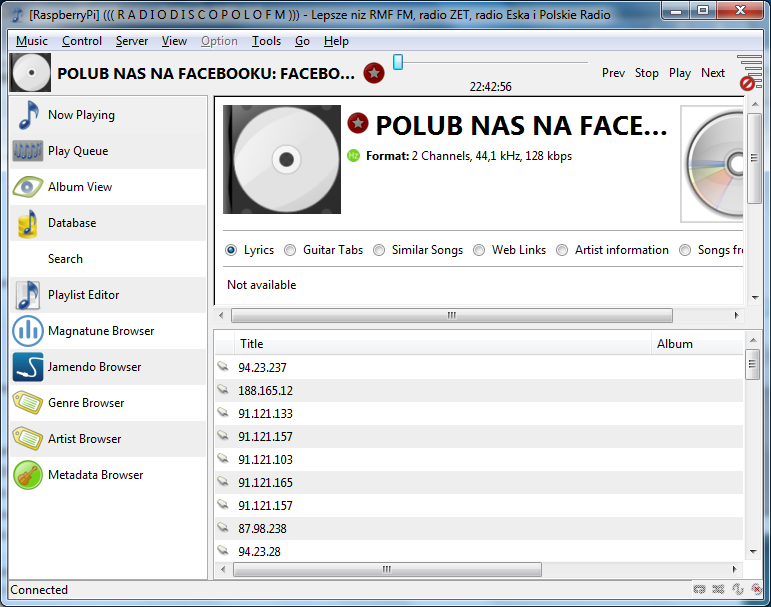
Fig. The main window of "Gnome Music Player Client".
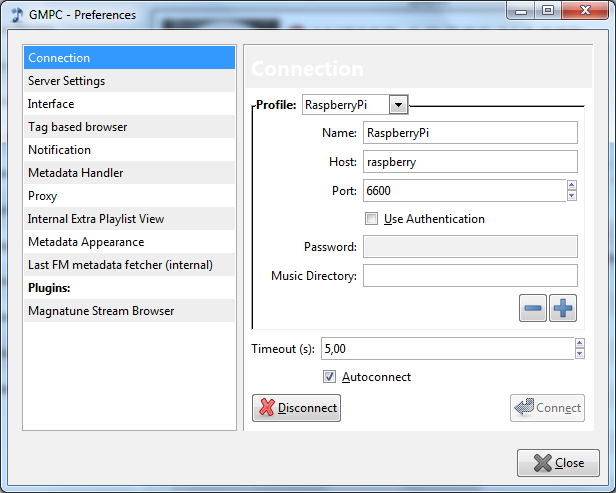
Fig. The configuration window.
This program lets us make full use of the internet radio, that is add and remove stations, build media libraries and so on.
One of the following articles will show how to control the radio with an application written in PHP.
A stream player is a project for home use, but the same platform is often the starting point for industrial equipment. We design electronics and write software for both of those worlds.
Copyright ©2026 systemypomiarowe.pl.